Miniature Workers Harvesting Colossal Blueberries
Generates a hyper-detailed cinematic sequence of diminutive agricultural laborers operating machinery amidst gargantuan fruit.
Prompt
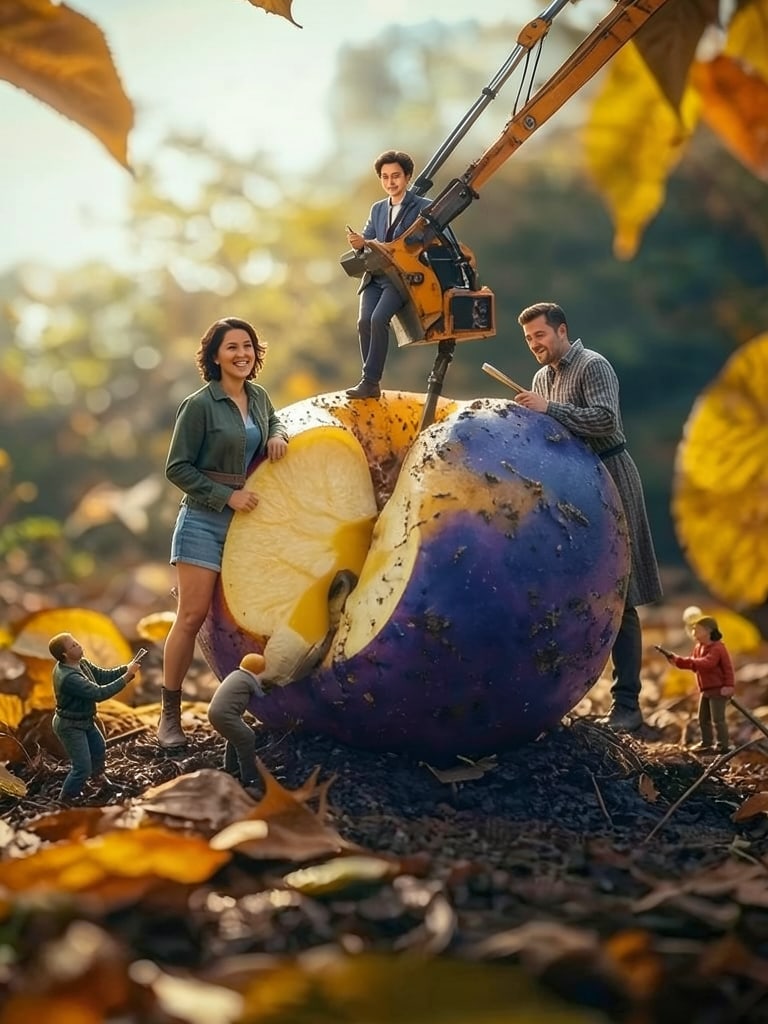
Render an ultra-realistic, cinematic macro sequence situated within an imaginative diminutive farming realm where miniature laborers gather and haul colossal blueberries measuring hundreds of times their natural scale.

The sequence opens on an upward-gazing macro frame featuring a gargantuan berry nestled in a sturdy steel collection bin. Dwarfing the staff, the fruit exhibits an authentic indigo and violet rind complete with microscopic pores, natural flaws, and a glistening coat of fresh condensation beads. Several droplets trickle down its contour to strike the damp earth beneath.

Surrounding the massive produce, a crew of miniature yet lifelike farmhands executes the collection duties. Possessing authentic human anatomy and lifelike complexions, they don azure work garments, vibrant safety hardhats, defensive handwear, heavy footwear, and industrial gear. They appear entirely authentic rather than toy-like or animated.

A vivid construction digger functions adjacent to the colossal fruit. This machine displays intricate metallic bodywork, authentic hydraulic pistons, flexible lines, articulated pivots, treads, scuffs, soil grime, and light wear marks. The hydraulic boom extends toward the giant berry while staff members stand close by, coordinating the process.

One employee gestures instructions to the machine operator while a colleague inspects the massive specimen. The mechanical scoop slides beneath the berry, gradually elevating it out of the holding bin. The enormous produce shifts with authentic mass and momentum.

 CAMERA SEQUENCE

Shot 1 — Establishing shot:
Begin with a broad cinematic macro framing that showcases the diminutive staff, massive blueberries, and vibrant excavator. The lens sits extremely low to the terrain, amplifying the perceived scale of the fruit.

Shot 2 — Slow push-in:
Gradually drift the apparatus toward the crew as they ready the gear. Employ a razor-thin focal plane, keeping the foreground berry softly out of focus while the personnel remain tack-sharp.

Shot 3 — Excavator close-up:
Transition to an intricate tight shot of the construction vehicle. Highlight extending hydraulic cylinders, articulating steel joints, shifting rubber tracks, and subtle mechanical shaking.

Shot 4 — Giant blueberry close-up:
Cut to an extreme close-up of the fruit. Feature its authentic textured peel, minuscule pores, organic blemishes, and moisture beads mirroring the surroundings.

Shot 5 — Human scale reveal:
Slowly back the lens away to emphasize how minuscule the workers appear against the sheer magnitude of the harvest.

Shot 6 — Harvesting action:
As the machine hoists the massive berry and the crew directs the movement, the produce pivots under its own heaviness, flinging cascading water droplets onto the personnel and apparatus.

Shot 7 — Final cinematic shot:
Circle lazily around the central group of fruit, workers, and machinery while the backdrop displays numerous other colossal berries. Conclude with the small staff stationed beside the gathered harvest to underscore the extreme scale disparity.

 ENVIRONMENT

A verdant agricultural setting populated by towering blueberry bushes, oversized foliage, robust stalks, damp earth, miniature blades of turf, pebbles, and standing water.

The terrain must feature authentic sludge and dampness. Microscopic shoe prints, tire ruts, and fallen foliage ought to be scattered around the personnel.

Establish a powerful sense of proportion: microscopic-scale staff and equipment enveloped by immense natural berries and flora.

Incorporate faint atmospheric haze in the far distance alongside authentic spatial depth.
How to use
Paste the prompt into Kling. Swap the subject and keep the lighting, lens and style details for a consistent look.
Use case
Cinematic Video — workers, shot
 video / Runway
#workers#crispdetail#cinematicfilmgrain#cinematic#4k#dramaticshadows#shot#dramaticlighting#action#animation
Studio tools
AI Optimizer
Improve, shorten, expand or retarget this prompt for another image or video model. Every result is saved as a new version — the original is never overwritten.
Improve prompt
Produces optimized, concise, detailed, beginner and model-specific versions.
Generate variations
Professional, creative, cinematic, minimal and advanced.
Prompt history
- v1 · Original1 month ago